Windows Installer Builder
Create Professional Windows Installers Without Writing Scripts
OnSnap Windows Installer App helps small developers, software sellers, consultants, and business owners package Windows desktop software through a guided wizard. Add your files, choose your main executable, review the configuration, and build a cleaner installer experience than a raw ZIP download.
14-day trial available. The trial is the primary path so you can test the workflow on your own Windows machine before purchasing.
$49 USD
One-Time Single-Computer License
- Wizard-based installer project creation
- EXE installer generation for Windows desktop software
- MSI support through WiX export and build workflow
- Designed for practical small-business and indie software distribution
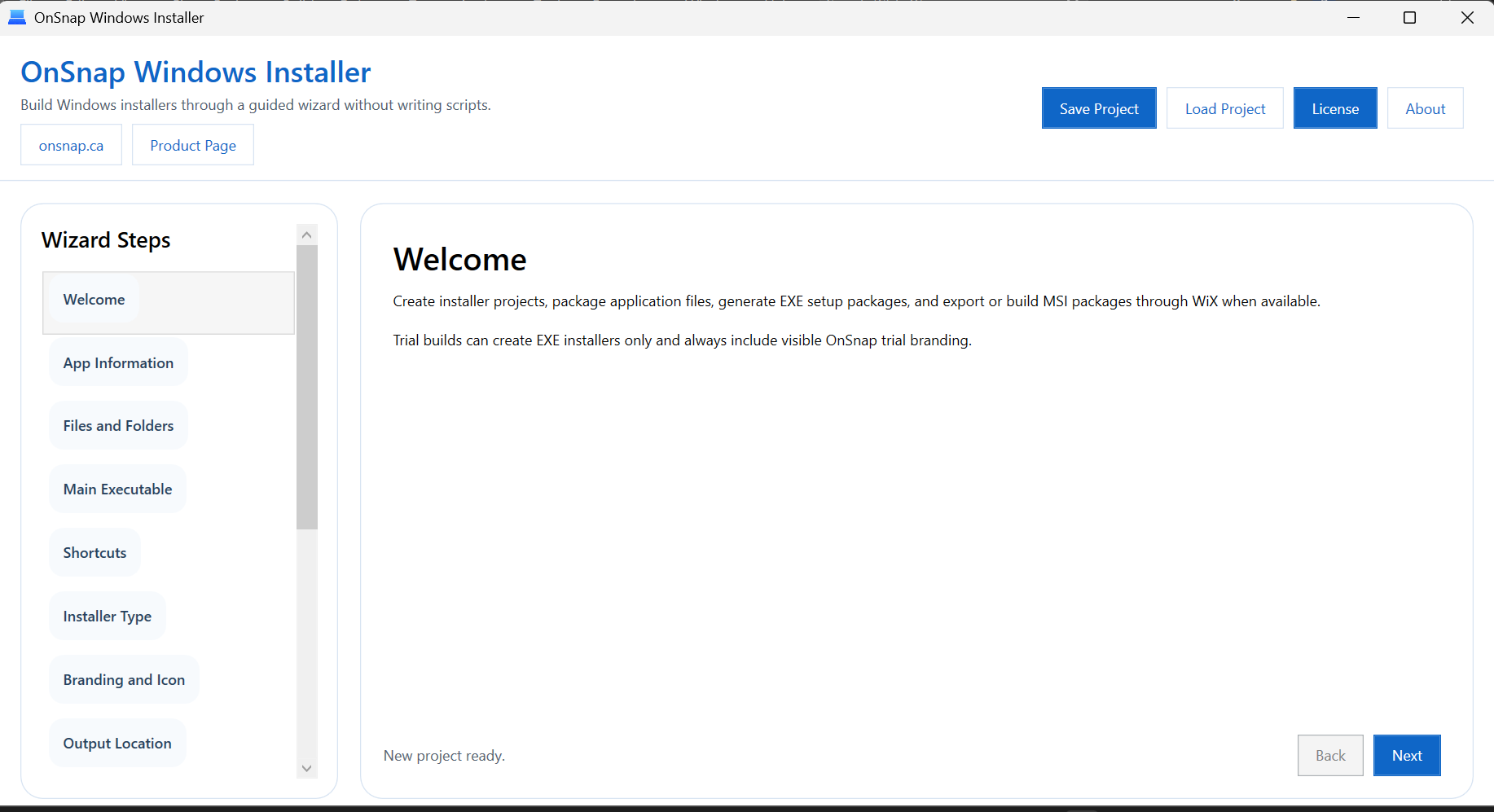
A clean wizard flow helps non-technical users build installer projects without writing setup scripts manually.
One-time license
Pay once for a single-computer license in v1 with no subscription attached to the product.
Simple wizard workflow
Move from app details to files, shortcuts, review, and build in a guided sequence.
EXE installer creation
Build a practical Windows installer package for desktop software distribution.
MSI support through WiX
Export or build MSI outputs when the WiX toolchain is available.
Problem
Many installer tools are capable, but they can still feel too technical for people who just need to ship a Windows app.
Scripting-based installer systems are powerful, but they often assume a developer wants to learn setup syntax, maintain installer definitions by hand, and troubleshoot packaging details at a lower level.
For small software sellers and consultants, that creates friction. You may already have a working desktop application and simply need a cleaner way to package it for customers, clients, or internal users.
Manual ZIP distribution works, but it looks less professional and leaves more setup work to the person receiving your software.
Solution
OnSnap Windows Installer App is built to make the packaging process simpler, faster, and easier to understand.
Instead of asking users to author installer scripts from scratch, the software walks through the core steps in a wizard: add application files, select the main executable, set shortcuts, review the build summary, and generate installer output.
The goal is not to imitate a massive enterprise packaging platform. The goal is to help practical Windows software publishers create a more polished delivery experience without unnecessary overhead.
That makes it a better fit for independent developers, consultants, small businesses, and internal app owners who want straightforward Windows installer creation.
Screenshots
See the product before you download the trial.
The interface is built around a clean wizard layout so configuration stays readable from start to build output.
Wizard-driven project setup keeps application details, files, and installer decisions in a structured workflow.
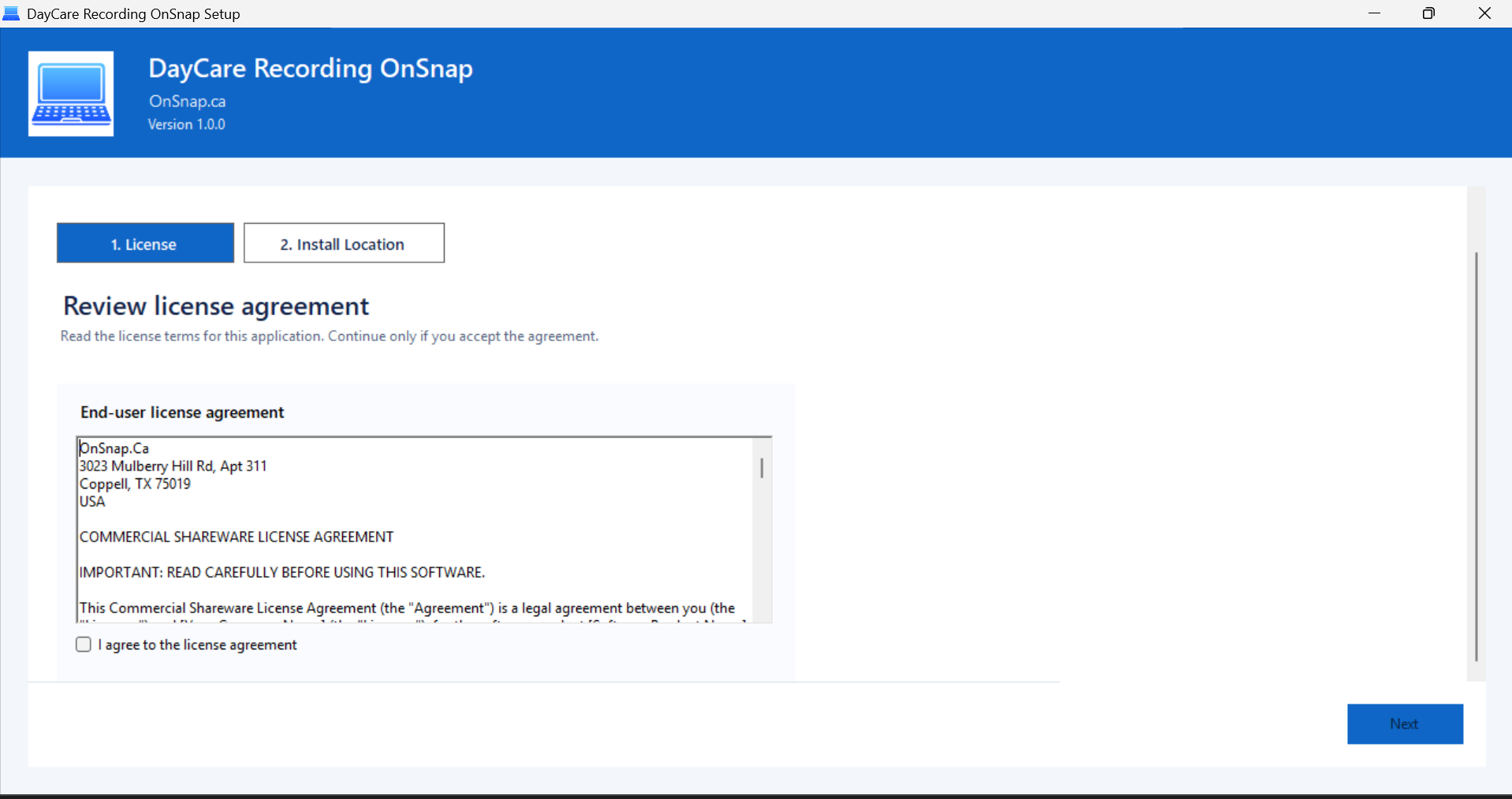
Review the installer summary, validate the configuration, and move into a cleaner build process for EXE output and WiX-based MSI support.
Features
Focused features for real Windows desktop packaging work.
Guided installer project wizard
Create installer projects through a guided, step-by-step workflow instead of writing packaging scripts manually.
Add files and folders
Collect the application files you need to ship and organize them into a buildable installer project.
Select main executable
Choose the application entry point so the installer knows which executable represents the installed app.
Set app name, publisher, version, and icon
Define the identity of the software package so the installer output looks more polished and easier to trust.
Desktop and Start Menu shortcuts
Enable shortcut options without having to author the shortcut behavior by hand.
EXE installer generation
Build practical EXE-based installer output for Windows desktop application distribution.
MSI support through WiX export and build
Export WiX-compatible installer files and build MSI output when WiX is available on the machine.
Installer project save and load
Save project configuration and reopen it later instead of repeating the packaging setup each time.
Build log and validation checks
Review validation feedback and build logs so missing fields and output issues are easier to spot.
Uninstall entry support
Generate installer behavior that can register uninstall details for a more standard Windows software experience.
Trial and license management
The software includes a trial workflow and a local single-computer licensing model for practical commercial distribution.
Trial
A 14-day trial lets users test the workflow before paying.
The trial is designed for honest evaluation. Users can create installer projects, save and load projects, and preview the installer configuration before moving into production use.
- 14-day trial access
- Preview and project setup included
- Trial EXE builds include OnSnap trial branding
- MSI features require the paid license
- Paid license removes the trial branding restrictions
Who It Is For
A practical fit for people shipping Windows software without wanting a complex packaging toolchain.
- Indie software developers
- Small business software owners
- Consultants delivering desktop apps
- Students building Windows projects
- Internal company tool developers
Pricing
$49 one-time license for one computer.
$49 USD
Single-Computer License | No Subscription For V1
The paid license is meant for independent developers, small businesses, consultants, internal tool owners, and other Windows software publishers who want a straightforward installer-builder product they can own outright on one machine.
The page stays trial-first, but if you are ready to purchase, secure checkout is available below with Stripe or PayPal using the existing OnSnap payment configuration.
Stripe
PayPal
One-Time Purchase
- Single-computer license
- No subscription required for v1
- Good fit for practical desktop software distribution
- Trial remains available if you want to evaluate first
FAQ
Short answers for trial users and buyers.
What does OnSnap Windows Installer App do?
It helps users create Windows installer packages for desktop applications through a wizard-based workflow instead of hand-writing installer scripts.
Does it create EXE installers?
Yes. The product is positioned around EXE installer creation for Windows desktop software.
Does it support MSI?
Yes, through WiX export and build support. MSI output depends on the WiX toolchain being available.
Do I need to write scripts?
No. The core selling point is that the product provides a guided wizard so non-technical users can work without authoring installer scripts manually.
Is there a trial?
Yes. A 14-day trial is available at https://onsnap.ca/owi.zip.
Is the license one-time?
Yes. This page sells a one-time v1 license rather than a subscription.
Is the license for one computer?
Yes. The offer on this page is a single-computer license.
Does it collect payment information?
Checkout is handled through Stripe and PayPal using the site’s existing payment integration. The page itself does not ask you to enter card data directly into custom fields.
Final Call To Action
Start with the free trial, then buy the full license when you are ready to ship without trial branding.
If you want a simpler way to create Windows installers for desktop apps, download the trial now and evaluate the workflow on your own machine.
Payment
Stripe and PayPal are accepted at the bottom of this page.
The payment section is intentionally placed after the main selling content so visitors can understand the product first and download the free trial if they are still evaluating it.
If you are ready to buy, use the secure Stripe or PayPal option in the pricing box above. The page follows the existing OnSnap payment integration pattern and uses the configured site payment settings.
Primary goal: start with the trial. When the product already fits your need, the one-time $49 purchase option is ready below.